
If you fail to plan, you plan to fail.
That is why a good property agent should always do his or her homework and be adequately prepared before meeting a client. After all, why throw a good lead down the drain after you have painstakingly acquired it?
In today’s day and age, with information all around, there’s an additional pressure on agents to be more knowledgeable than the homeowners they’re serving, especially when it comes to their property of choice.
If just the thought of that is making you more stressed than your O levels, you’re in luck. With our Researcher tool, every meeting with your client will be like an open book test- with all the answers in front of you, if you know where to look.
What is Researcher
Researcher is a tool that allows agents to get full visibility of all transactions in the market, with the ability to narrow them down by location, project, housing type and others.
Researcher not only helps to make agents appear smarter, but along with the information fed, allows agents to help their clients be smarter property consumers. In essence, we assemble the data, all you need to do is to present it.
With Researcher, you can:
– Define search criteria and any other parameters
– Compare historical price and volume trends across developments, districts and project types
– Generate easy-to-compare volume bar charts, average PSF lines and scatter plots with growth/loss estimates
– Interpret the charts and witness the power of data-backed persuasion
How does it work?
Comparing Projects within a certain location
- With Researcher, you can begin by choosing to “Add New Segment”. If you would like to compare a Project, choose a particular block or condominium to analyse. For instance, The Quartz.
- You can change the time frame (recommended 5 to 10 years) accordingly to how you would like to show your client.
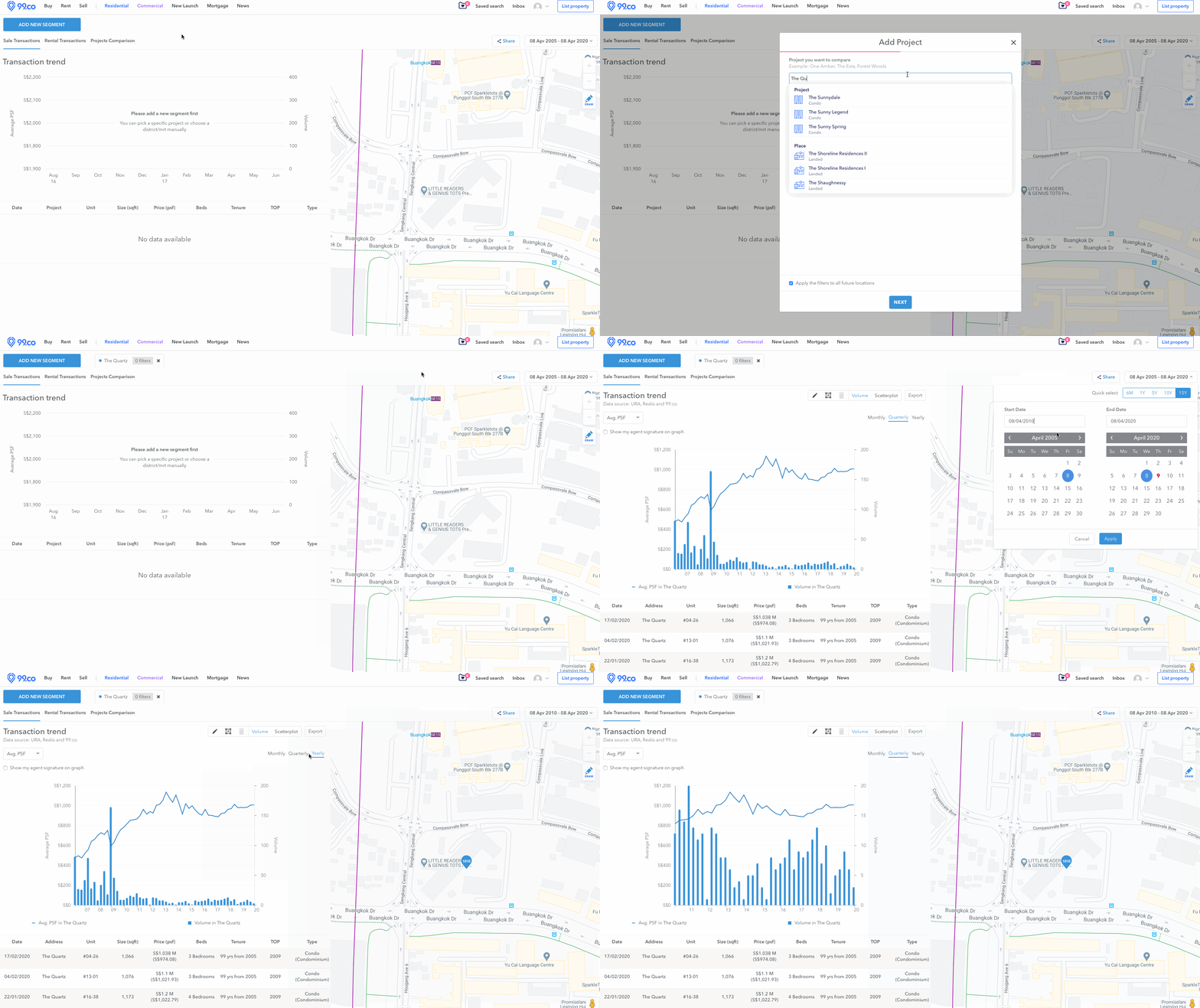
- Choose to present your statistics quarterly to present a more detailed and accurate trend of transactions across the year.
- You can choose between Sale or Rental Transactions.
- From there, you can change the time and frequency of the metrics according to Average PSF or Average Price.
- Make sure to add your agent signature on the graph!
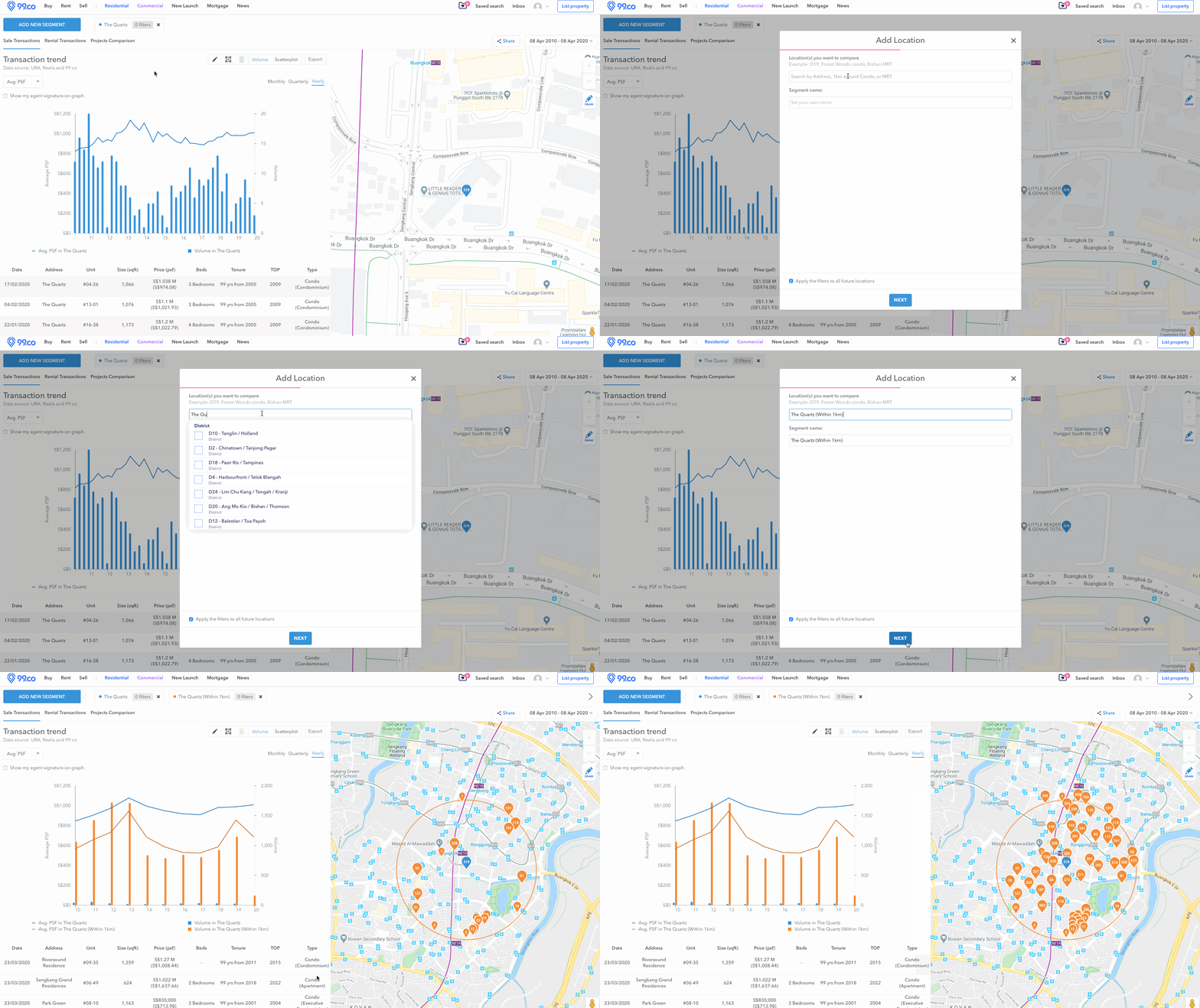
- With this feature, you can easily add other projects within 1KM vicinity around your chosen project (eg. The Quartz), you will be able to create a visual comparison between all projects with clear lines presenting which project reaps higher investment.
Click on the Pen to do calculations to create a line of comparison, showing the percentage change from one year to another.
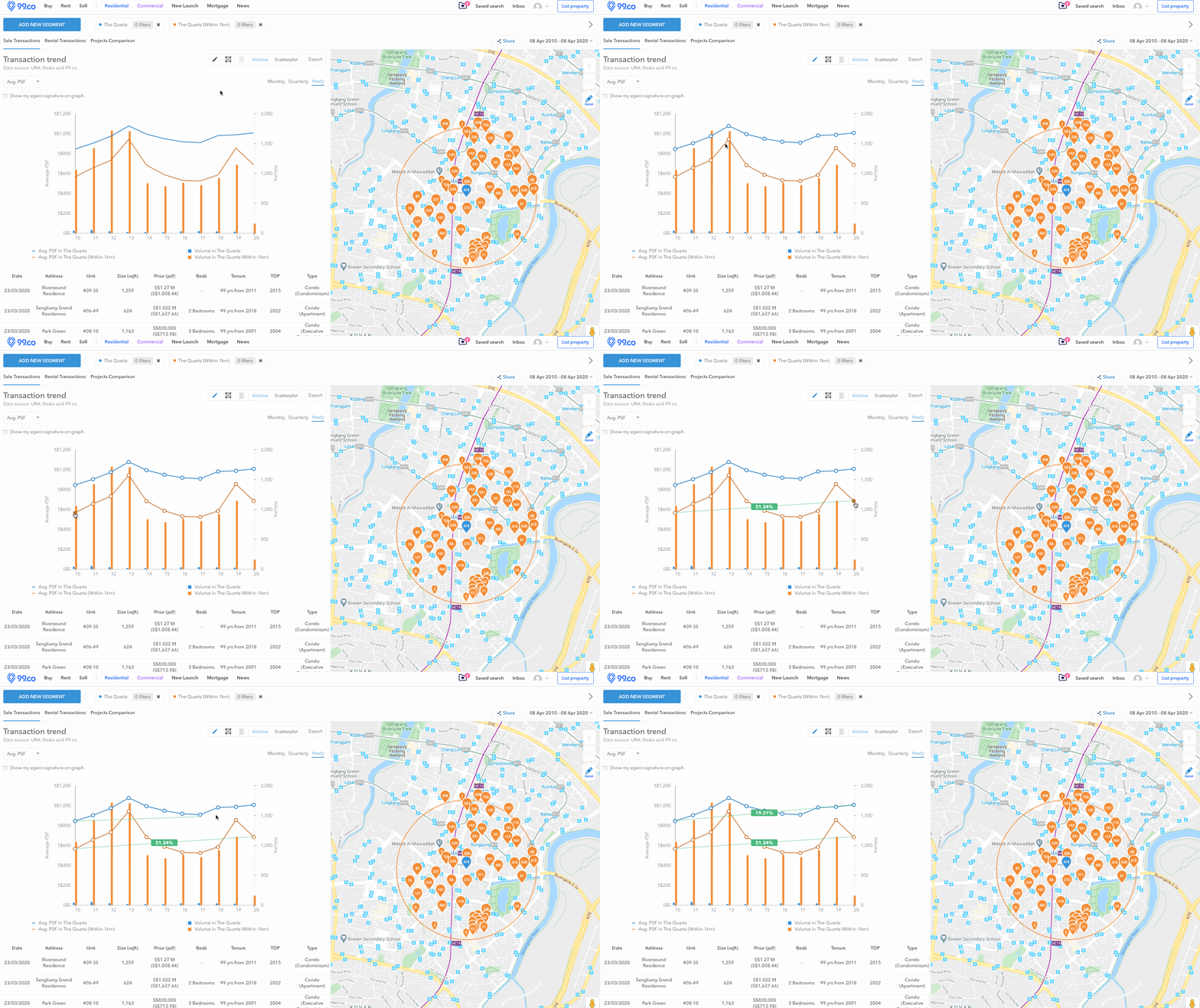
- By noting a line of profit, you will be able to insert a comment in the graph, showing your clients that you can double your investment from purchasing the property.
- You will be able see all projects being compared in the table below the chart and export it as a PNG to be shared to clients across communication channels such as Whatsapp, Facebook or email.
Comparing projects across districts
- Add a new segment and this time, choose to “Add Location” and choose which district you are interested in (eg. District 9, Orchad river valley).
- Using the “Draw on map” option, draw out which district you would like to compare projects with.
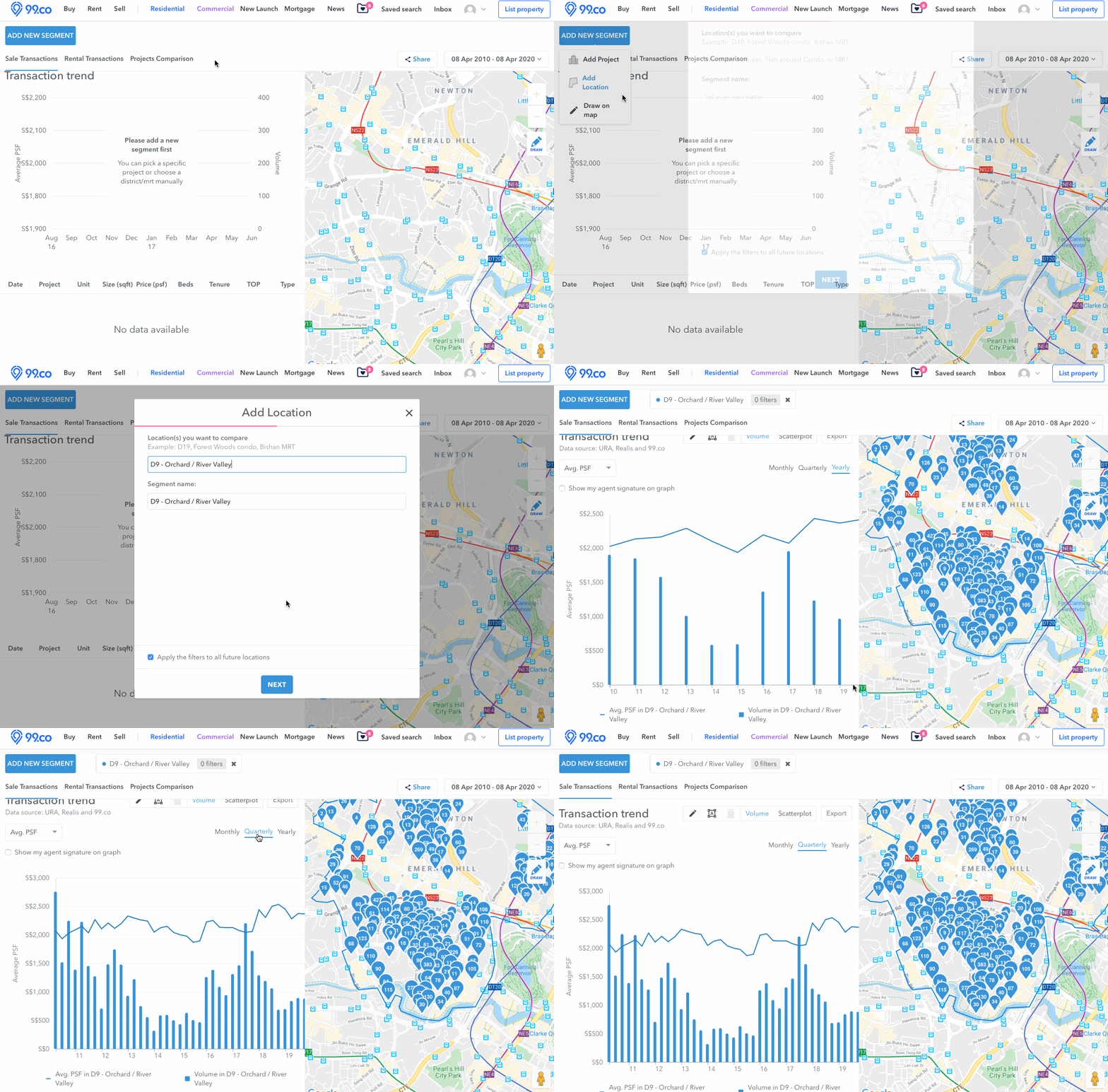
After drawing, you will be able to easily compare projects:
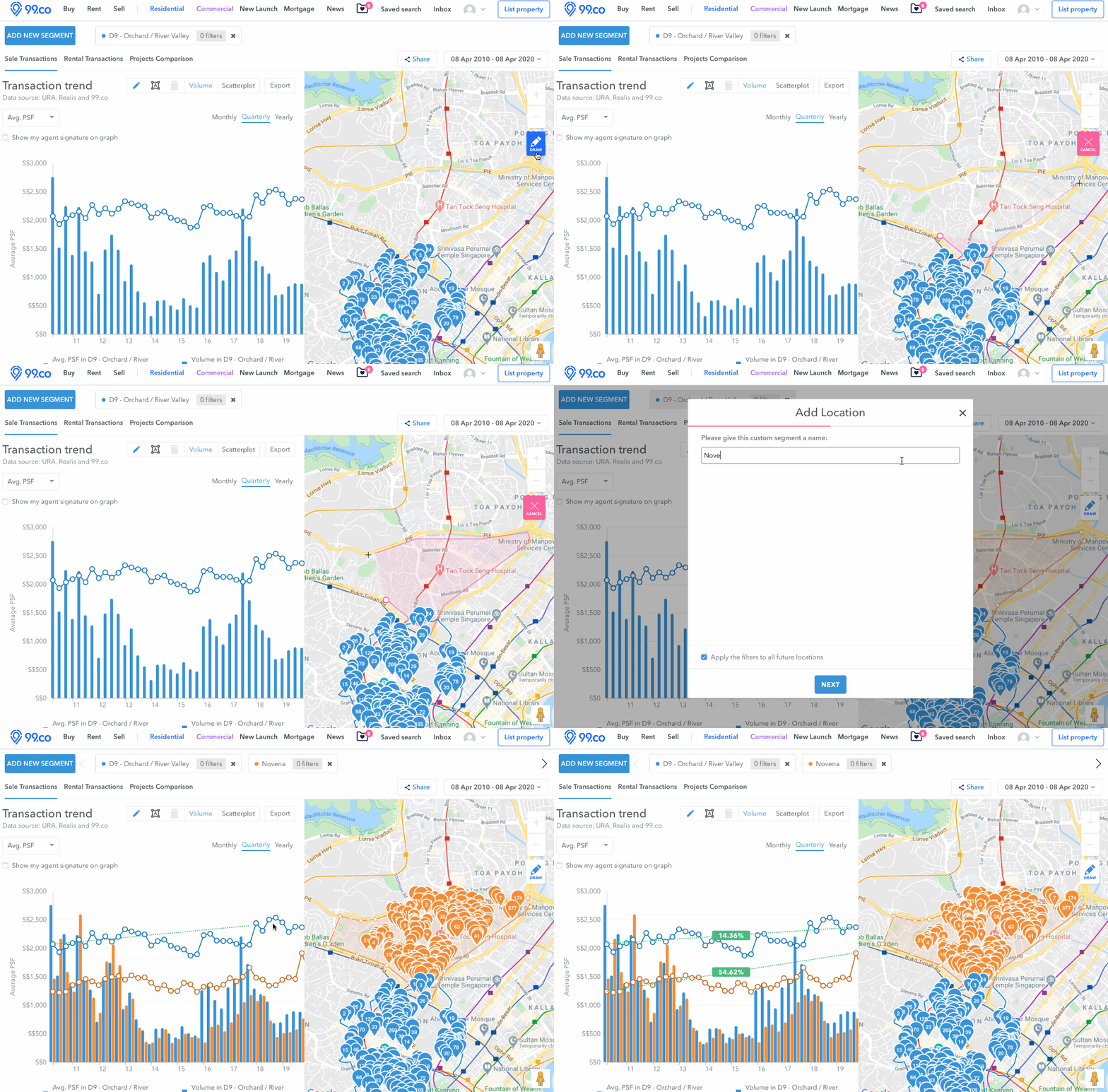
If all our gifs got you feeling confused, here’s a video tutorial you can refer to for more help:
We hope this has been helpful. Want to see what else we’re doing to help our agent friends? Check out our Agent Survival Guide filled with resources we have put together to help Agents tide through this crisis.
About Felicia Tan


Looking to sell your property?
Whether your HDB apartment is reaching the end of its Minimum Occupation Period (MOP) or your condo has crossed its Seller Stamp Duty (SSD) window, it is always good to know how much you can potentially gain if you were to list and sell your property. Not only that, you’ll also need to know whether your gains would allow you to right-size to the dream home in the neighbourhood you and your family have been eyeing.
One easy way is to send us a request for a credible and trusted property consultant to reach out to you.
Alternatively, you can jump onto 99.co’s Property Value Tool to get an estimate for free.
If you’re looking for your dream home, be it as a first-time or seasoned homebuyer or seller – say, to upgrade or right-size – you will find it on Singapore’s fastest-growing property portal 99.co.
Meanwhile, if you have an interesting property-related story to share with us, drop us a message here — and we’ll review it and get back to you.
Join our social media communities!
Facebook | Instagram | TikTok | Telegram | YouTube | Twitter





Leave a comment